> ## Documentation Index
> Fetch the complete documentation index at: https://docs.featpaper.com/llms.txt
> Use this file to discover all available pages before exploring further.
# Usage & Credits
> Learn how to check and manage your credit usage.
## What Is the Credit System?
FeatPaper uses a **credit system** to track AI feature usage. Credits are deducted each time you use an AI feature, and you can check your current usage in Settings.
Credits are managed at the workspace level. All members within the same workspace share the credit pool.
***
## Features That Use Credits
Credits are deducted for the following AI features.
| Feature | Description |
| ------------------------------------------------------- | -------------------------------------------------------------------------------------------------------------------------- |
| **AI analysis questions (Insights chat)** | Deducted each time you ask AI a question about your viewing data — once per question. |
| **AI mobile conversion** | Deducted when converting a document into a mobile-friendly format. |
| **AI engagement score & AI summary (content insights)** | Deducted when analyzing what a viewer read, on documents where the owner has turned the **AI engagement score** toggle on. |
| **Suggested question generation** | Suggested questions are generated automatically when you open the Insights sidebar, and this uses credits. |
**Suggested questions are charged only once per day.** For the same link and the same date range, closing and reopening the sidebar or refreshing the page does not incur another deduction on that day. Credits are charged again when the day changes or you change the date range.
**Re-analyzing the same document for the same viewer does not cost extra.** The previously generated result is reused. Credits are charged again only when you replace the document with a new version or run a new analysis on new viewing data.
Basic features such as document uploads, share link creation, and plugin exports do not use credits.
***
## Credits per Analysis
The credits used for a single analysis **vary with the size of the document.** The more content there is to analyze, the more credits are deducted.
As a rough guide:
* **One analysis of a large document**: about 20–25 credits
* **A single short question**: considerably less than that
You can check the exact amount deducted for each entry in the detailed usage records under **Settings > Usage**.
***
## Credits by Plan
| Plan | Monthly credits |
| ------------ | -------------------- |
| **Free** | 30 |
| **Pro** | 1,000 |
| **Business** | 3,000 + 600 per seat |
Credits are **renewed every month.** Paid plans renew based on the billing cycle, and the free plan renews based on the sign-up date.
***
## Checking Usage
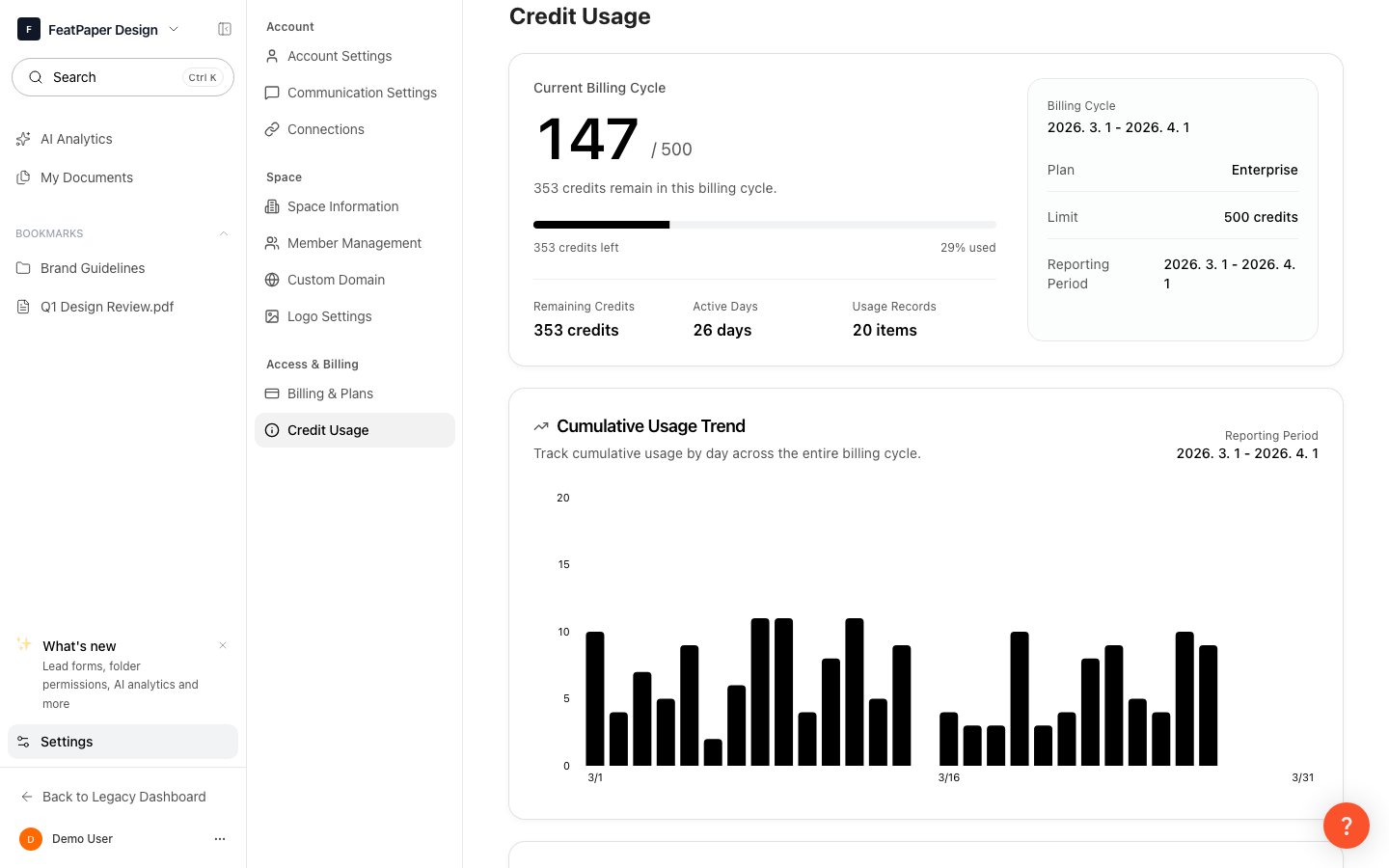 Click **Settings** at the bottom of the sidebar.
In the Settings screen, select the **Usage** tab.
Check the usage and remaining credits for each AI feature.
***
## Daily Usage History
You can view recent credit usage trends through the **daily graph** in the Usage tab.
Each entry includes the following information:
* **Timestamp**: The time the credits were deducted
* **Feature type**: The AI feature that used the credits (AI analysis questions, AI engagement score & AI summary, and so on)
* **Amount**: The number of credits deducted
* **User**: The member who used the credits
***
## Purchasing Credits
If your current plan's credits are running low, you can purchase additional credits from **Settings > Usage**.
When credits are depleted, AI features will be unavailable. You must either purchase more credits or wait until the next renewal date.
Unused credits do not carry over to the next month.
Click **Settings** at the bottom of the sidebar.
In the Settings screen, select the **Usage** tab.
Check the usage and remaining credits for each AI feature.
***
## Daily Usage History
You can view recent credit usage trends through the **daily graph** in the Usage tab.
Each entry includes the following information:
* **Timestamp**: The time the credits were deducted
* **Feature type**: The AI feature that used the credits (AI analysis questions, AI engagement score & AI summary, and so on)
* **Amount**: The number of credits deducted
* **User**: The member who used the credits
***
## Purchasing Credits
If your current plan's credits are running low, you can purchase additional credits from **Settings > Usage**.
When credits are depleted, AI features will be unavailable. You must either purchase more credits or wait until the next renewal date.
Unused credits do not carry over to the next month.