> ## Documentation Index
> Fetch the complete documentation index at: https://docs.featpaper.com/llms.txt
> Use this file to discover all available pages before exploring further.
# Compare Plans
> Learn about the features of each FeatPaper subscription plan and how to change your plan.
## Plan Comparison
FeatPaper offers a variety of subscription plans to match your usage needs.
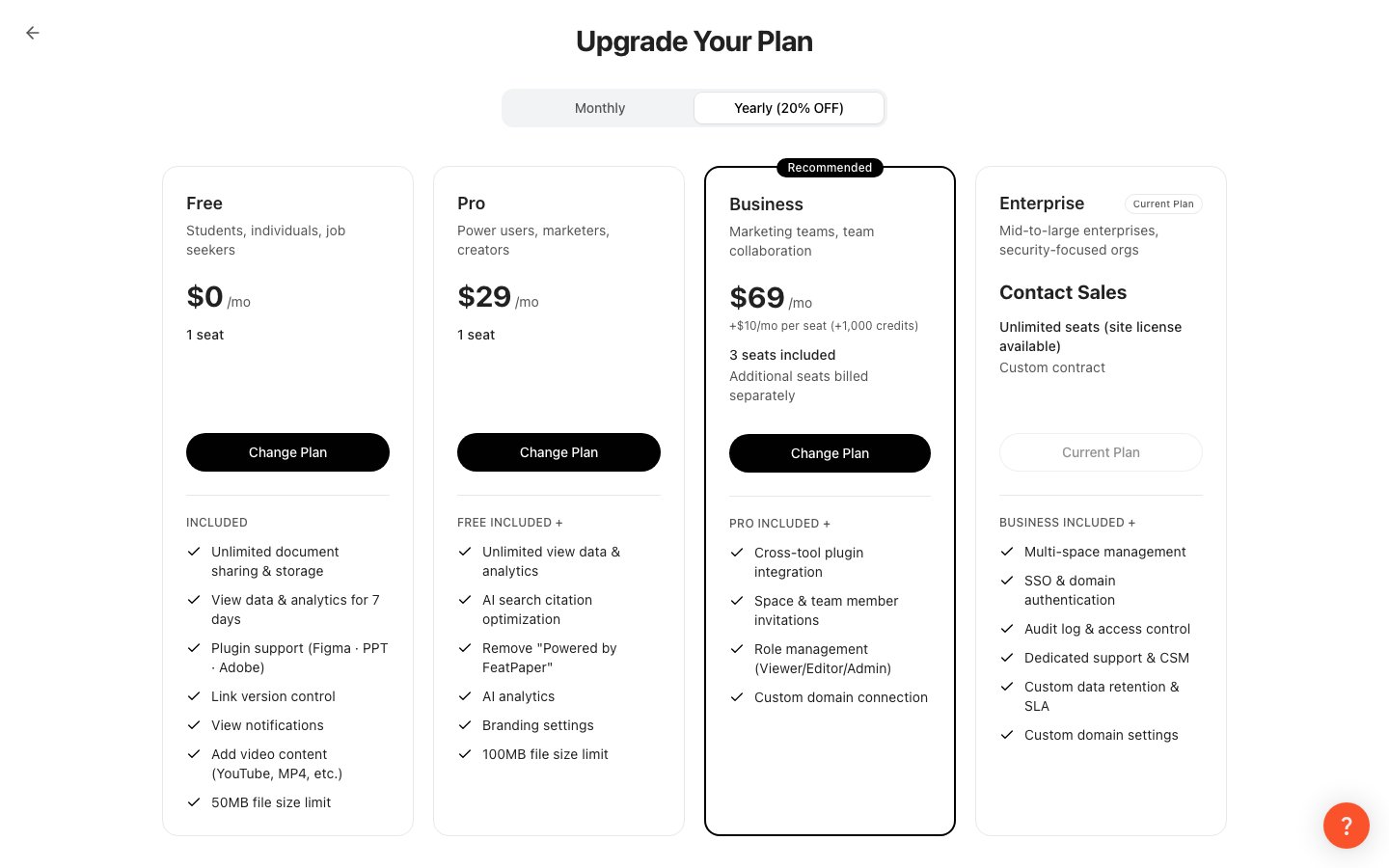 | Feature | Free | Pro | Business | Enterprise |
| -------------------------- | :------------------------: | :-------: | :-------: | :--------: |
| Analytics retention period | 7 days (date range locked) | Unlimited | Unlimited | Unlimited |
| Custom share links | Up to 3 | Unlimited | Unlimited | Unlimited |
| AI Analytics | X | O | O | O |
| Branding settings | X | O | O | O |
| Cross-document linking | X | O | O | O |
| Figma plugin | X | O | O | O |
| Express plugin | X | O | O | O |
| PowerPoint plugin | X | O | O | O |
| Zapier integration | X | O | O | O |
| Member invitation | X | X | O | O |
| AI Mobile Conversion | X | X | X | O |
| Custom domain | X | X | X | O |
| Invoice billing | X | X | X | O |
***
## Key Differences
A free plan to get you started.
* Analytics data is only available for **7 days** from the document upload date, and the date range selector is locked.
* Custom share links (dedicated links) can be created up to **3 per document**.
* Plugins and external integrations are not available.
A plan for individual users who need advanced features.
* Analytics data is retained **indefinitely**.
* Create **unlimited** custom share links.
* Analyze document data with **AI Analytics**.
* Use **branding settings** and **cross-document linking**.
* All plugins (Figma, Express, PowerPoint) and Zapier integration are available.
A plan for organizations that need team collaboration.
* Includes everything in Pro.
* **Member invitation** lets you share the space with your team.
* Configure **role permissions** (Viewer / Editor / Admin).
A plan for mid-to-large organizations that need security and custom operations.
* Includes everything in Business.
* **Custom domain** connection is available.
* **AI Mobile Conversion** is available.
* **Invoice billing** and custom feature discussions are available.
***
## Changing Your Plan
Navigate to **Settings** → **Plan** tab at the bottom of the sidebar, or click any locked feature (padlock icon) to open the **Upgrade Your Plan** screen in full-screen mode.
Choose either **Monthly** or **Annual (20% off)** billing.
Click the **Change Plan** button for the plan you want. Your current plan is shown as **Current Plan**.
Enter your payment information and complete the subscription.
When downgrading, features exclusive to your current plan (plugins, cross-document linking, etc.) may be deactivated. Be sure to review before making changes. Also, if your seats in use (members and pending invitations) exceed the seat limit of the target plan, the change will be blocked — remove members first, then try again.
***
## Payment Methods
FeatPaper processes payments through **LemonSqueezy**.
| Payment Method | Description |
| --------------- | --------------------------------------------------------- |
| **Credit Card** | Major cards including Visa and Mastercard |
| **PayPal** | Payment via PayPal account |
| **Invoice** | Enterprise plan only; invoiced after separate arrangement |
Payment history can be viewed under **Settings > Billing**, where you can also download receipts.
| Feature | Free | Pro | Business | Enterprise |
| -------------------------- | :------------------------: | :-------: | :-------: | :--------: |
| Analytics retention period | 7 days (date range locked) | Unlimited | Unlimited | Unlimited |
| Custom share links | Up to 3 | Unlimited | Unlimited | Unlimited |
| AI Analytics | X | O | O | O |
| Branding settings | X | O | O | O |
| Cross-document linking | X | O | O | O |
| Figma plugin | X | O | O | O |
| Express plugin | X | O | O | O |
| PowerPoint plugin | X | O | O | O |
| Zapier integration | X | O | O | O |
| Member invitation | X | X | O | O |
| AI Mobile Conversion | X | X | X | O |
| Custom domain | X | X | X | O |
| Invoice billing | X | X | X | O |
***
## Key Differences
A free plan to get you started.
* Analytics data is only available for **7 days** from the document upload date, and the date range selector is locked.
* Custom share links (dedicated links) can be created up to **3 per document**.
* Plugins and external integrations are not available.
A plan for individual users who need advanced features.
* Analytics data is retained **indefinitely**.
* Create **unlimited** custom share links.
* Analyze document data with **AI Analytics**.
* Use **branding settings** and **cross-document linking**.
* All plugins (Figma, Express, PowerPoint) and Zapier integration are available.
A plan for organizations that need team collaboration.
* Includes everything in Pro.
* **Member invitation** lets you share the space with your team.
* Configure **role permissions** (Viewer / Editor / Admin).
A plan for mid-to-large organizations that need security and custom operations.
* Includes everything in Business.
* **Custom domain** connection is available.
* **AI Mobile Conversion** is available.
* **Invoice billing** and custom feature discussions are available.
***
## Changing Your Plan
Navigate to **Settings** → **Plan** tab at the bottom of the sidebar, or click any locked feature (padlock icon) to open the **Upgrade Your Plan** screen in full-screen mode.
Choose either **Monthly** or **Annual (20% off)** billing.
Click the **Change Plan** button for the plan you want. Your current plan is shown as **Current Plan**.
Enter your payment information and complete the subscription.
When downgrading, features exclusive to your current plan (plugins, cross-document linking, etc.) may be deactivated. Be sure to review before making changes. Also, if your seats in use (members and pending invitations) exceed the seat limit of the target plan, the change will be blocked — remove members first, then try again.
***
## Payment Methods
FeatPaper processes payments through **LemonSqueezy**.
| Payment Method | Description |
| --------------- | --------------------------------------------------------- |
| **Credit Card** | Major cards including Visa and Mastercard |
| **PayPal** | Payment via PayPal account |
| **Invoice** | Enterprise plan only; invoiced after separate arrangement |
Payment history can be viewed under **Settings > Billing**, where you can also download receipts.